A consent banner that looks like your site.
TidyConsent keeps analytics and ad tools switched off until each visitor says yes, and lets you match the banner to your brand in a few clicks. Free, with nothing locked.
No accountNo codeNo pageview meter
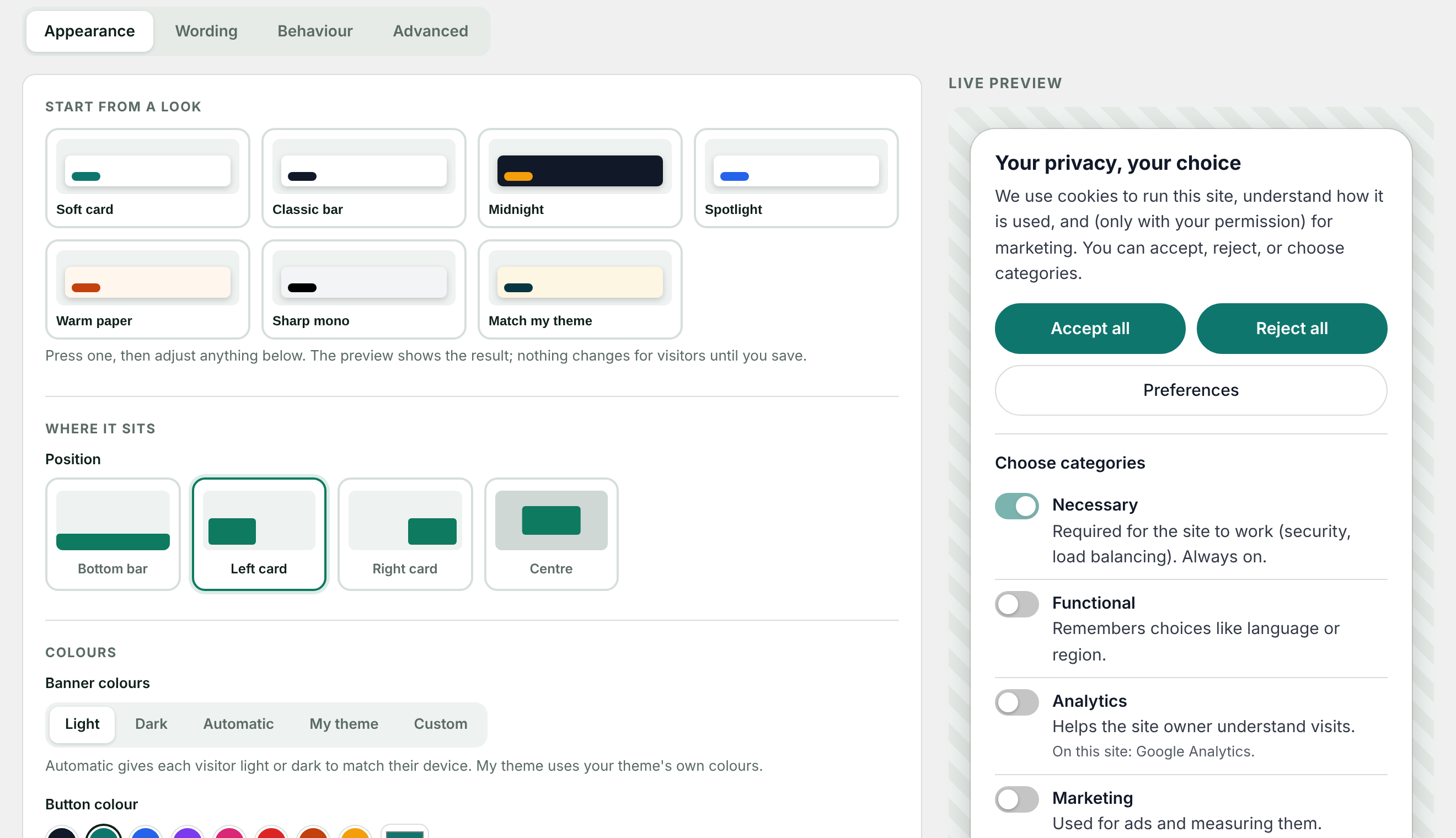
Pick a look. Press save. Done.
Start from a ready-made look, choose where the banner sits and your brand colour, and watch the preview follow. No drop-downs to decode and nothing to type unless you want to.
- Seven starting looksIncluding one that takes its colours straight from your theme.
- Always readableText and button colours are corrected by themselves if a choice would be hard to read.
- Your own CSS, if you likeReady-made tweaks you switch on with a press, or write your own.
Trackers actually wait for an answer.
Plenty of banners only look the part: the tools run anyway. TidyConsent finds the known tools in your pages and keeps each one off until that visitor allows its category.
- Works whether a tool was added as a script tag or pasted as the vendor's snippet
- Changing your mind later switches tools off again and clears their cookies
- The settings screen lists exactly what it is holding back on your site
- Login and security cookiesNecessaryAlways on
- Google AnalyticsAnalyticsWaiting
- Microsoft ClarityAnalyticsWaiting
- Meta PixelMarketingWaiting
- Google AdsMarketingWaiting
A record you can show.
Every choice is logged with the time and the categories allowed, so you can show what was asked and what was answered. No names, no email addresses, and no raw IP addresses are kept.
- Export the log as CSV whenever you need it
- A cookie policy page written from the tools your site really uses
- Visitors are asked again after six months, or the period you choose
| When | Allowed | Visitor |
|---|---|---|
| Today 14:02 | AnalyticsMarketing | c81f…a02d |
| Today 13:47 | Necessary only | 7b3e…19c4 |
| Today 13:15 | Analytics | e290…5f7a |
| Today 12:58 | AnalyticsMarketing | 04ad…c3b1 |
| Today 12:31 | Necessary only | 9f16…d870 |
The details are handled.
A fair choice, built in
Accept and Reject always look the same. You cannot accidentally build a banner that steers people.
Behaves the way you want
Slide or fade in, wait a moment first, add a close button, or have the page wait for an answer.
Every word is yours
Start from a tone — plain, friendly, formal or short — then edit anything.
After a "no"
A short note tells visitors how to change their mind, and a small button stays on every page.
Light and dark
Choose one, or let each visitor get the version their device prefers.
For developers
A small JavaScript API and an event when a choice changes, so your own code can respect it.
Running in about five minutes.
The settings screen opens with a short list of what to do, and each step has a button that takes you there.
-
Install the plugin
Known tools are held back from the first page view, before you have changed a single setting.
-
Make it yours
Pick a look and your brand colour. The preview updates as you go; visitors see nothing until you save.
-
Publish your policy
One press writes a cookie policy from the tools found on your site. Read it, publish it, and the banner links to it.
The tools it holds back
See it in two short videos.
Short on time? Watch the 26-second version · TidyConsent on YouTube
Free, and yours in a minute.
Tell us where to send it. Or let us look at your site first and show you what a visitor's browser is loading before they agree.
Flat pricing. No pageview meter.
The plugin is free and complete. Pro is one flat price per year — your bill never changes because your site had a good month.
Free
$0
Everything you need to ask properly.
- Banner, blocking, Consent Mode v2
- All styling and behaviour settings
- Cookie policy page and consent log
- Scan your site whenever you like
Pro — 1 site
$49/year
For a single WordPress site.
- Everything in Free
- Weekly re-scan with an email when a new tracker appears
- Hosted backup of your consent log
- Cancel any time from WordPress
Pro — 5 sites
$99/year
For up to five WordPress sites.
- Everything in the 1-site plan
- One key for up to five sites
- Move a seat to another site yourself
Your license key is shown as soon as payment completes.
Questions
Does it work with a caching plugin or CDN?
Yes. Every visitor is sent the same page with the known tools switched off, and each visitor's choice is applied in their own browser. If a performance plugin combines your JavaScript into one file, exclude the tracker scripts from that feature so TidyConsent can still see them.
Can I make it match my brand?
Yes, from the settings screen, without code: position, colours, button colour, logo, corners, font, wording and behaviour, with a live preview. Choose "Match my theme" and it uses your theme's own colours; choose "Automatic" and each visitor gets the light or dark version their device prefers. If you want more, there is a box for your own CSS.
Which tools does it hold back?
Google Analytics, Google Tag Manager, Google Ads, Meta Pixel, Microsoft Clarity, Hotjar, LinkedIn Insight Tag, TikTok Pixel, Pinterest Tag, X Pixel, and Microsoft Advertising — whether added as a script tag or pasted as the vendor's standard snippet. A tool that is not on this list is not held back.
Do I need Pro?
No. The banner, blocking, Google Consent Mode, styling, cookie policy, consent log and manual scan are all in the free plugin, with nothing locked.
What happens when a visitor changes their mind?
They can reopen the preferences at any time. Switching a category off removes that category's known cookies and reloads the page without those tools. A choice is asked for again after about six months, or whatever period you set.
Does this make my site legally compliant?
No tool can promise that. TidyConsent gives you the mechanics — asking first, honouring the answer, and keeping a record — and you remain responsible for how your site uses them.
Check your own site, with any plugin.
Is my cookie banner actually working?
A two-minute test in your browser that shows whether trackers wait for an answer.
Google Consent Mode v2, in plain English
The four signals, basic and advanced mode, and how to see what your site sends.
Why banners break behind caching
What page caches and script optimisers do to consent, and what to exclude.
Ask properly. Look good doing it.
Get the free plugin by email, or try every setting in your browser first.